Buy this exact design
YouTube Merch Shelf Requirements — ready to ship
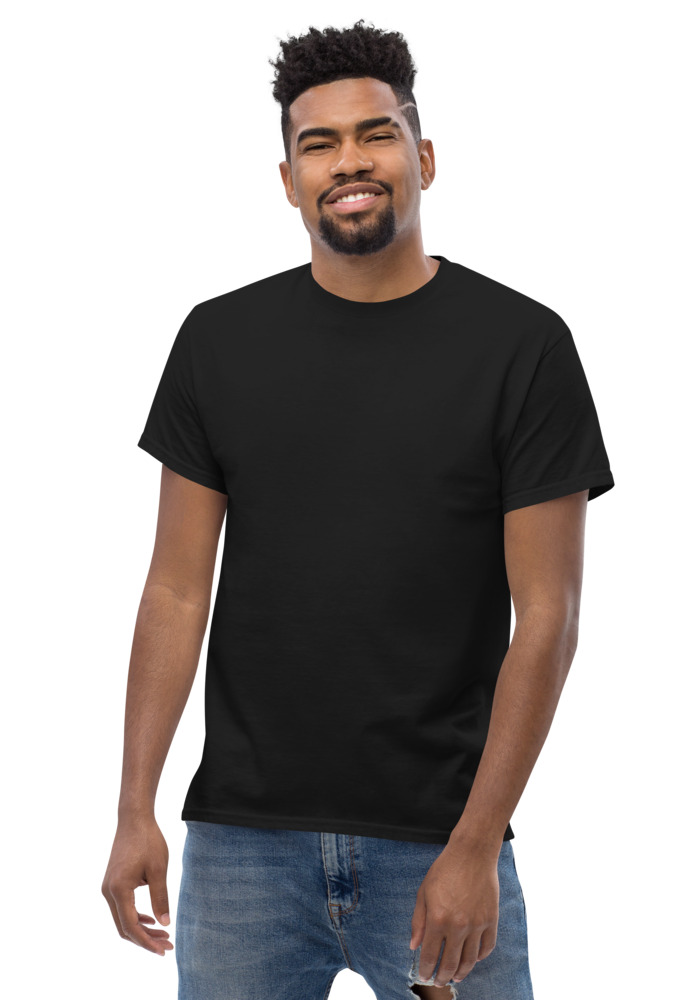
Preview · your design on a Black tee — the real blank
Ships in 5–9 days · Pay-in-4 available for eligible US orders at checkout
Design it right now
Classic Tee — with YOUR design on it
Upload art, type text, or let the AI design it — live preview, no minimums, from $24.99.
🎨 Put my design on this →
This design, ready to go
Get it on the Classic Tee — $24.99
Opens in the builder with this design placed — buy as-is, tweak the text, or swap the garment.
🛒 Customize & order this →Split eligible US orders into 4 interest-free payments with Shop Pay · No minimums · Ships in 5–9 days
Gildan 5000 · 100% cotton · 5.0–5.3 oz/yd² (170-180 g/m²) · blank sourced from Honduras · printed in the USA network · ships 5–9 days
The merch shelf — that row of products under a YouTube video — is the most visible merch surface on the platform, and the requirements around it confuse almost everyone. Here's the plain-English version of what YouTube actually requires, what changed with YouTube Shopping, and the part that matters most for small channels: how to sell merch today without waiting on any of it. Ready to order? creator merch, no minimum, pay in 4.
YouTube merch shelf requirements, decoded
The shelf runs through YouTube Shopping, and the core eligibility list looks like this:
- YouTube Partner Program membership — your channel is approved for monetization.
- Subscriber threshold — the classic shelf requirement for non-music channels has been 10,000 subscribers (music channels need an Official Artist Channel). YouTube Shopping has opened lower-subscriber paths over time, in some cases down to the 1,000-subscriber Partner Program floor.
- Audience setting — your channel isn't set as made-for-kids and doesn't lean heavily on made-for-kids videos.
- Clean record — no hate-speech community guideline strikes and no significant monetization-policy violations.
- Location — you're in a country where the Partner Program operates.
These shift more often than people expect, so treat YouTube's official help center as the source of truth before you plan a launch around the shelf.
Linking a store to YouTube
Once eligible, you connect a store through YouTube Shopping's approved platforms in YouTube Studio (Earn tab), pick which products appear, and the shelf shows under eligible videos. If you run your own storefront on a supported e-commerce platform, that's the connection route — products you feature there flow onto the shelf.
The truth small channels need: you don't need the shelf
The shelf is a bonus surface, not the business. What actually sells merch at every channel size is the same three placements you control from day one, at zero subscribers:
- The description link — first two lines, above the fold.
- The pinned comment — posted the minute the video goes live.
- The verbal callout — you, wearing the shirt, saying where it lives.
That's why the smarter order of operations is: have merch ready first, add the shelf later when you qualify. Design is the part you can finish today — the free AI design studio turns a text prompt into a print-ready graphic (5 free a day, no sign-up, your channel name spelled exactly as typed), and it drops straight onto a classic tee at $24.99 or a hoodie from $31. No store build, no minimums, printed per order and shipped in 5–9 days. Shop Pay pay-in-4 may be available for eligible US orders at checkout.
While you grow toward the threshold
Use the waiting period the way channels that convert do: order one sample, wear it in videos so the design gets screen time for months, and let the description link do the selling. When the shelf unlocks, you arrive with proven designs instead of launching cold. The step-by-step for that whole arc is the YouTube merch line pillar guide — and if you're deciding what to put the design on first, start with the creator product guide or the broader custom merch for YouTubers page.
One rule that protects your channel and your orders: the merch has to be YOUR brand — your name, logo, catchphrase, original characters. Game logos, existing anime characters, and celebrity references are other people's IP; an IP guard here blocks them at checkout, and YouTube Shopping policy is no friendlier. Original designs keep every surface clean.
See the merch in real life
Real garments, printed and embroidered to order.
Frequently asked questions
What are the requirements for the YouTube merch shelf?
YouTube Partner Program membership, a channel not set as made-for-kids, no hate-speech strikes, and a subscriber threshold — classically 10,000 for non-music channels, with lower paths opening through YouTube Shopping. Requirements change, so verify on YouTube's official help page.
Can I sell merch on YouTube with under 10,000 subscribers?
Yes — the shelf is just one surface. A description link, pinned comment, and verbal callout work from zero subscribers, and plenty of channels sell steadily that way. Have the merch ready first; add the shelf when you qualify.
How do I link a store to YouTube?
Through YouTube Shopping in YouTube Studio's Earn tab, using an approved e-commerce platform. Once connected, you choose which products appear under your videos.
What merch can I show on YouTube?
Your own brand — channel name, logo, catchphrase, original characters. Existing anime characters, game logos, and celebrity imagery are third-party IP; our design tool and checkout IP guard block them, and shopping platforms enforce the same line.
Can fans pay for merch in installments?
Shop Pay pay-in-4 may be available for eligible US orders at checkout, which helps on hoodies and multi-item orders.
Why is my merch shelf not showing even though I meet the requirements?
The usual culprits are product review status, audience settings, or viewer context. Every product goes through a YouTube and Google Merchant Center review before appearing, videos marked made for kids never show shopping features, and viewers in unsupported countries or on certain devices will not see the shelf at all. Also note YouTube has shifted product placement into the video description area, so the shelf may be live but in a different spot than you expect; check the review status of each item in YouTube Studio's shopping section first.
How long does YouTube take to approve merch for the shelf?
Individual product reviews often clear within about 24 hours, but the full check against YouTube's guidelines and Google's product listing standards can take three to five days, especially for a newly connected store. Products stay invisible on your channel until approved, so connect your store and import items several days before a launch video rather than the morning of. If an item gets rejected, fixing the flagged issue and resubmitting restarts the review.
Which store platforms can connect to YouTube Shopping?
YouTube supports a specific list of commerce platforms, currently including Shopify, Fourthwall, Spring, Spreadshop, TeePublic, Shopline, and Wix, plus some region-specific options. Your products have to live on one of these supported platforms to appear on your channel, so pick your store home with that integration in mind. Whichever platform you use, print-on-demand products you have designed elsewhere can typically be listed there and then synced to YouTube.
Does the merch shelf show on mobile and Shorts?
Yes. Shopping products appear across desktop and the mobile apps, and creators can tag products on Shorts as well as long-form videos, which matters since Shorts drive a huge share of discovery now. Visibility can still vary by the viewer's country and device type, so do not panic if one specific viewer reports not seeing it. Tagging the exact product featured in a video converts far better than relying on the general shelf alone.
Can a made-for-kids channel use the merch shelf?
No. If your channel audience is set as made for kids, or a significant number of your videos are, shopping features are disabled because of child-privacy rules around commerce targeting. Individual videos marked made for kids also drop the shelf even on otherwise eligible channels. Family-friendly is fine; it is the formal made-for-kids designation that blocks shopping, so audit your audience settings if your shelf vanished.
Design it right now
Classic Tee — with YOUR design on it
Upload art, type text, or let the AI design it — live preview, no minimums, from $24.99.
🎨 Put my design on this →This design, ready to go
Get it on the Classic Tee — $24.99
Opens in the builder with this design placed — buy as-is, tweak the text, or swap the garment.
🛒 Customize & order this →Split eligible US orders into 4 interest-free payments with Shop Pay · No minimums · Ships in 5–9 days
Customize authentic blanks with your own original logo, slogan, or artwork. We do not print protected logos, copyrighted artwork, celebrity likenesses, game assets, team marks, or designs you do not have rights to use.
Or start with the art: free AI design tool + all free tools →